Self-service kiosks are widely used in retail, transportation, hospitality, healthcare, and public service environments. From ticket vending machines and self-ordering terminals to visitor check-in systems, these unattended devices depend on reliable computing hardware to operate efficiently.
For kiosk manufacturers and system integrators, choosing the right industrial PC for self-service kiosk applications involves more than processor performance. Connectivity, power requirements, enclosure dimensions, cooling, peripheral compatibility, and recovery after power failures can all affect long-term reliability.
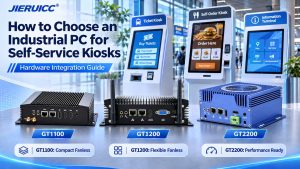
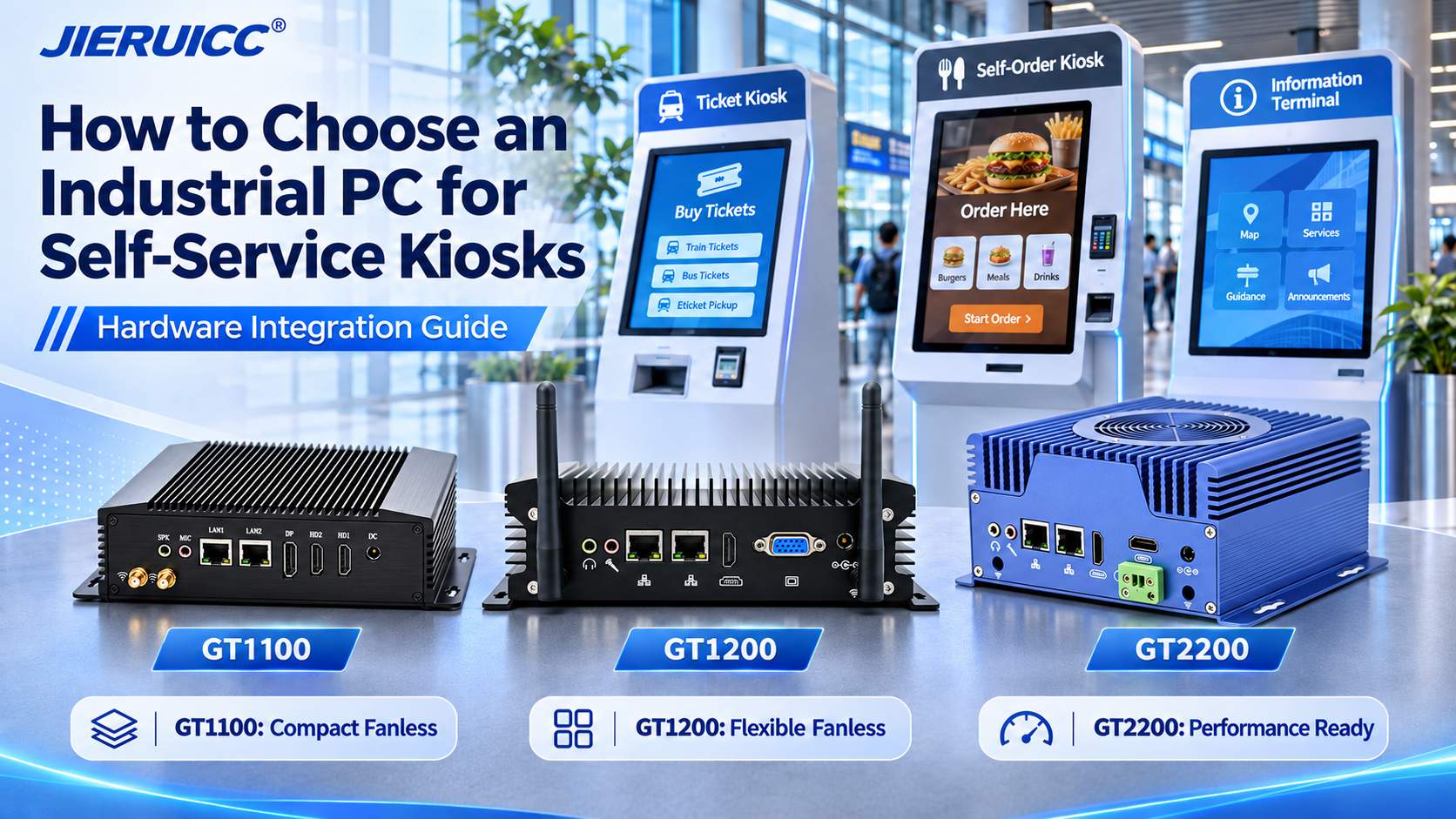
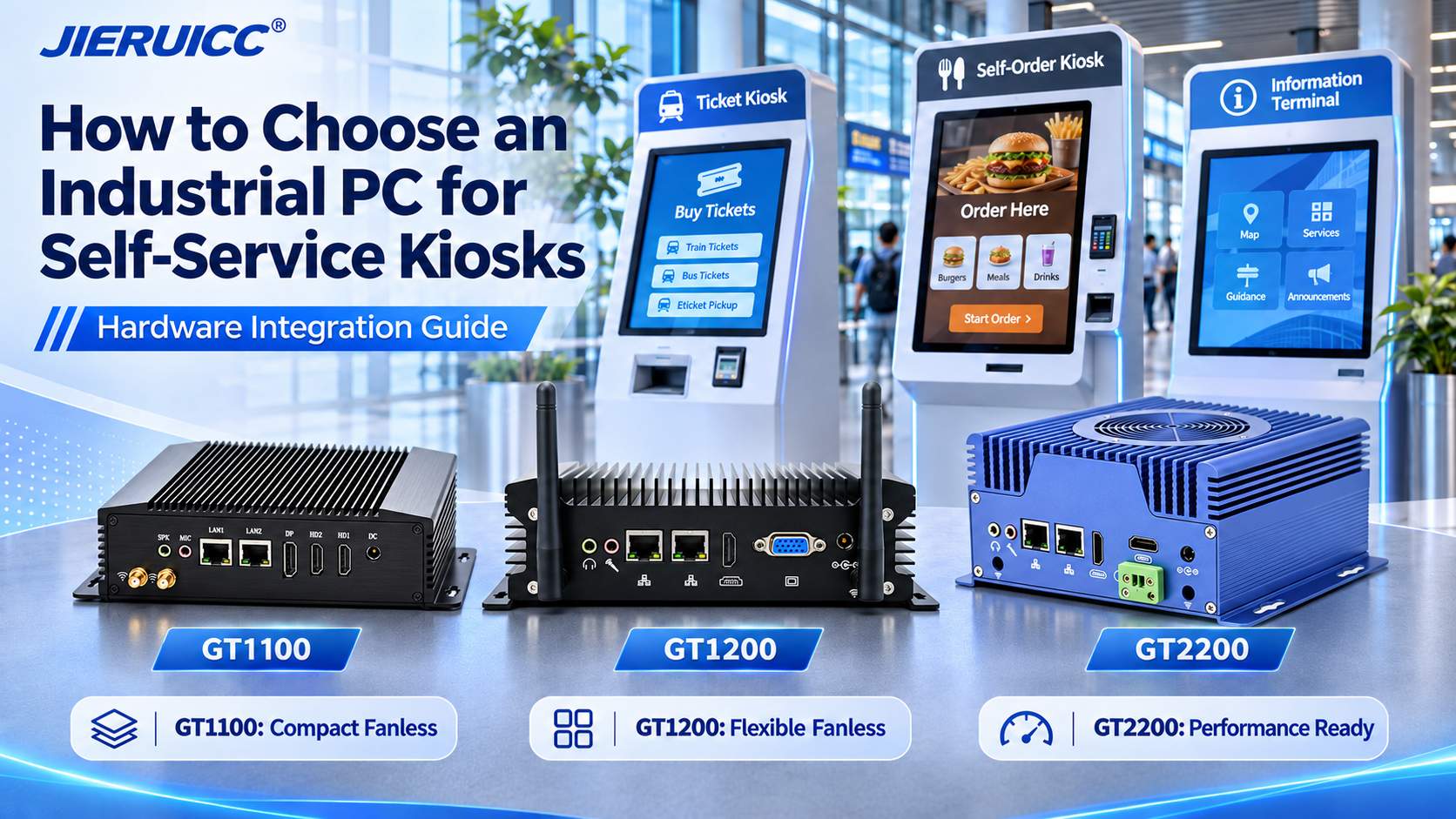
This guide explains the key hardware selection criteria and compares three JIERUICC industrial PC models—GT1100, GT1200, and GT2200—to help OEMs and project buyers select a suitable computing platform.
1. What Makes an Industrial PC Suitable for Self-Service Kiosks?
A suitable kiosk industrial PC should provide sufficient native I/O ports, compatible processing performance, reliable power recovery, effective thermal management, and a compact design that fits inside the kiosk enclosure.
Unlike a standard desktop computer, a kiosk PC must operate as part of a complete unattended system.
Typical applications include:
- Self-service ticketing and ticket collection machines
- Restaurant self-ordering and payment kiosks
- Retail self-checkout terminals
- Information and wayfinding kiosks
- Hotel and visitor check-in terminals
- Queue management and registration machines
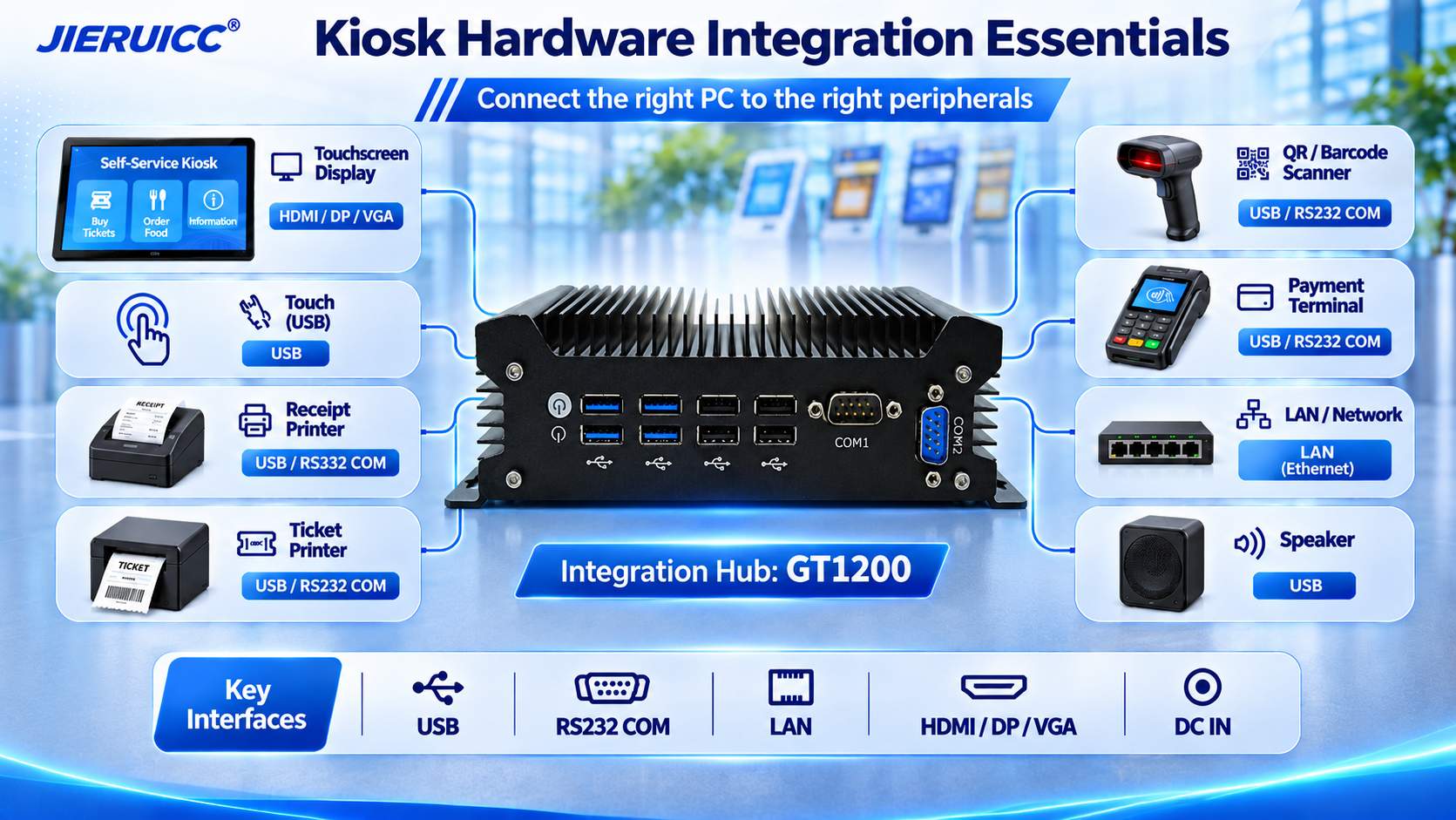
The industrial computer normally serves as the central computing platform. It runs the kiosk application and communicates with touchscreens, scanners, printers, network equipment, and compatible peripheral controllers.
The kiosk manufacturer or system integrator remains responsible for application software, device protocols, payment integration, and the complete terminal design.
Common Hardware Integration Challenges
Several problems can arise when an unsuitable computer is selected:
Insufficient connectivity: Too few USB or serial ports may require additional adapters or hubs, increasing wiring complexity.
Unreliable peripheral communication: Incorrect serial specifications, incompatible drivers, or unstable USB connections can interrupt printing, scanning, and other functions.
Thermal limitations: Heat accumulation inside a compact metal cabinet may cause throttling or unexpected shutdowns.
Difficult power recovery: A kiosk that remains powered off after an electrical interruption may require an expensive on-site service visit.
Limited installation space: A computer may fit within the cabinet but leave insufficient room for connectors, cables, mounting brackets, or ventilation.
Addressing these issues during hardware selection can reduce redesign work and simplify future maintenance.
2. How to Select the Right Industrial PC for Kiosk Integration
2.1 Check COM, USB, and LAN Ports Before Selecting the CPU
Peripheral connectivity is often the first hardware requirement to define.
A typical self-service kiosk may combine several devices, each with its own communication interface.
| Kiosk Peripheral | Typical Connection | Key Integration Requirement |
| Touchscreen monitor | HDMI, DP, or VGA + USB | Display output and touch-controller compatibility |
| Receipt or ticket printer | USB, RS232, or Ethernet | Correct protocol, driver, and power supply |
| Barcode / QR scanner | USB or RS232 | Communication mode and driver support |
| Payment terminal | USB, Ethernet, or RS232 | Compatibility with payment provider SDK |
| RFID / NFC reader | USB or serial | Protocol and application compatibility |
| Camera | USB 3.0 or Ethernet | Bandwidth and processing requirements |
| Kiosk controller | RS232, RS485, or USB | Electrical interface and command protocol |
Why Native Serial Ports Matter
Many embedded kiosk peripherals still use RS232 communication.
Industrial PCs with native DB9 COM ports can connect compatible serial printers, scanners, and control modules without relying on external USB-to-serial converters.
However, RS232 and RS485 are different electrical interfaces and are not interchangeable. Confirm the peripheral’s voltage levels, pin assignments, communication protocol, and connector requirements before ordering.
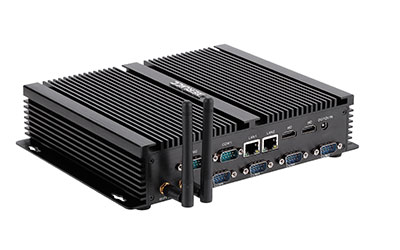
The JIERUICC GT1100, GT1200, and GT2200 each offer two native RS232 COM ports in their published standard configurations.
For projects requiring additional serial ports or RS485 communication, the available hardware configuration should be reviewed separately.
Plan USB Capacity Carefully
USB ports may be needed for touchscreen input, QR scanners, payment peripherals, cameras, and receipt printers.
The GT1100 offers four USB ports, while the GT1200 and GT2200 each provide eight.
For kiosks with multiple USB peripherals, a larger number of native ports can simplify installation and reduce dependence on external USB hubs.
The final port allocation should also consider cable routing, USB power limits, and whether the application requires USB 3.0 bandwidth.
2.2 Verify Touchscreen and Display Compatibility
A touchscreen typically requires two connections: a video signal to display content and a separate USB connection for touch input.
For example, an HDMI touchscreen may connect to the industrial PC through:
HDMI → Display signal
USB → Touch input
This arrangement requires a compatible touchscreen controller and operating system driver.
Some kiosk applications also need a second display for advertising, instructions, or transaction status.
JIERUICC offers several display configurations:
GT1100: Two HDMI outputs and one DisplayPort output, suitable for projects requiring multiple display connections.
GT1200: Two HDMI outputs or one HDMI plus one VGA output, depending on the selected version.
GT2200: Two HDMI outputs for dual-display applications.
Before finalizing the computer, confirm the required display resolution, orientation, touch mapping, and supported mirrored or extended display modes.
2.3 Match Processor Performance to the Application
Not every self-service kiosk needs a high-performance processor.
For basic information terminals, queue systems, QR code check-in, and browser-based applications, a low-power Intel N100 platform may provide sufficient processing capability.
More demanding applications may require Intel Core processors, particularly when the system simultaneously handles multiple peripherals, database operations, high-resolution interfaces, or local video processing.
A practical selection approach is:
Basic kiosks: Intel N100 with 8GB RAM and a 128–256GB SSD as an initial evaluation configuration.
Standard multifunction kiosks: Intel Core i3/i5 with 8–16GB RAM and a 256GB SSD.
Higher-workload terminals: An appropriately selected Intel Core i5/i7 platform, with memory and storage sized according to the actual application.
These are starting points for testing, not guaranteed performance requirements.
The final configuration should be validated using the customer’s kiosk software and real peripheral devices.
2.4 Choose the Right Cooling Design for 24/7 Operation
Many self-service kiosks operate throughout the day or remain available continuously.
The cooling design should therefore match the cabinet’s internal temperature, ventilation, and processor workload.
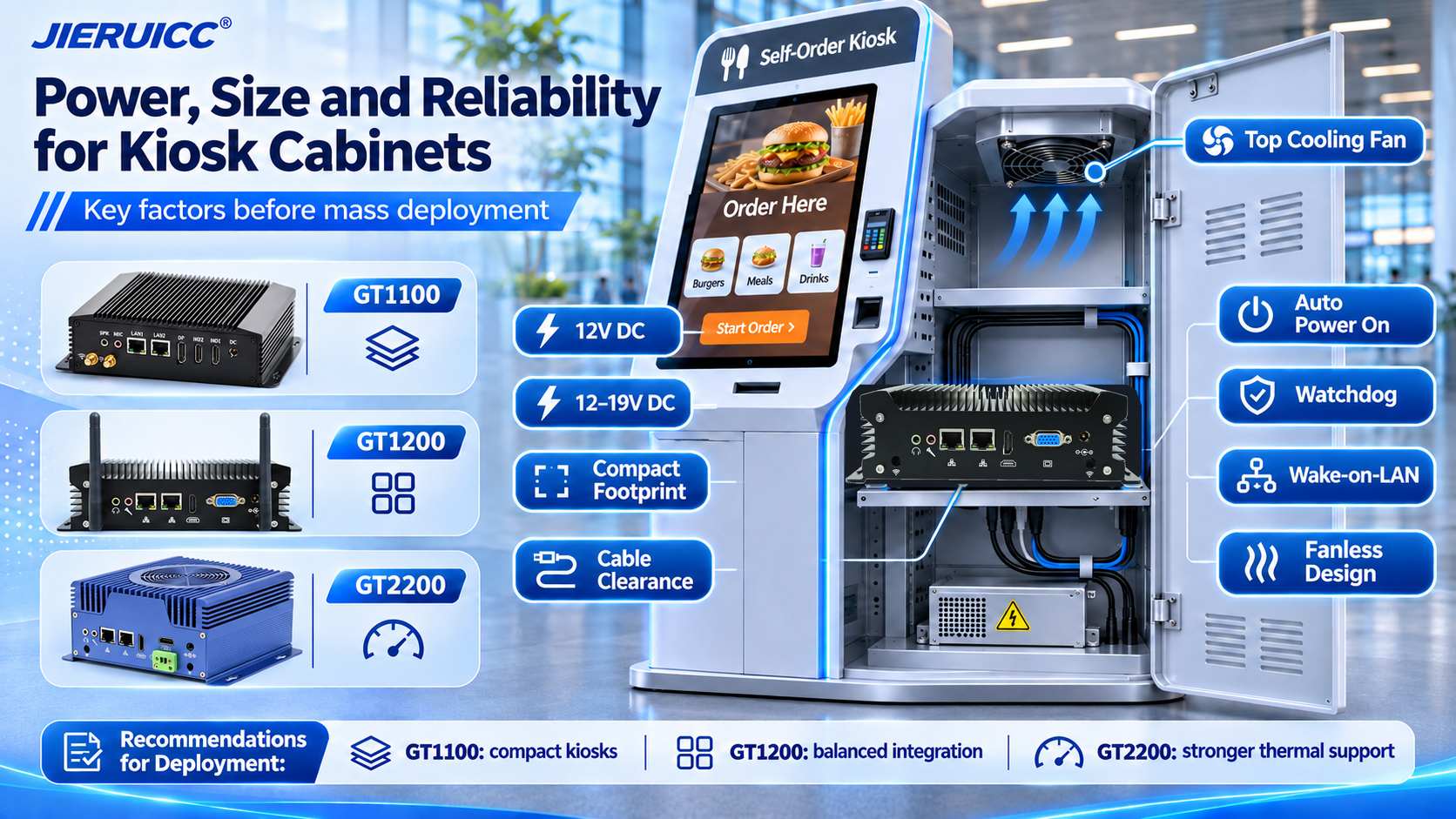
Fanless industrial PCs, such as the GT1100 and GT1200, use their aluminum enclosures to dissipate heat. Eliminating a mechanical cooling fan reduces fan-related maintenance and can be advantageous in dusty or noise-sensitive environments.
The GT2200 combines an aluminum chassis with a top-mounted cooling fan, making it an option for projects that benefit from fan-assisted heat dissipation.
However, both approaches require proper thermal design.
A fanless PC must have an effective path for transferring heat away from its enclosure. A fan-cooled system needs sufficient airflow and consideration for dust accumulation and fan maintenance.
For kiosk OEMs, thermal testing should take place inside the final cabinet rather than only on an open workbench.
2.5 Check DC Power Input and Cabinet Dimensions
Power supply compatibility is another critical consideration.
The three JIERUICC models have different published DC input specifications:
- GT1100:Standard 12V DC power input
- GT1200:12–19V DC input, depending on configuration
- GT2200:12–19V DC input, depending on configuration
Select the approved adapter and power capacity for the exact hardware configuration. Do not assume that every voltage within a published range is suitable for every CPU and peripheral load.
When integrating a computer into an existing kiosk cabinet, also consider:
Mechanical clearance: Allow additional space for HDMI, USB, LAN, COM connectors, power cables, and mounting accessories.
Power distribution: Confirm whether the computer uses a dedicated adapter or a suitable regulated cabinet power supply.
Cable management: Secure connectors to reduce accidental disconnection during servicing or vibration.
Thermal clearance: Avoid blocking heat-dissipation surfaces or fan ventilation paths.
Maintenance access: Position the computer so technicians can reach its power button, ports, and storage components when required.
The industrial PC’s chassis dimensions alone do not represent the total installation space needed.
2.6 Require Automatic Recovery After Power Failure
Unattended kiosks should be designed to recover from routine power interruptions without requiring an operator to press the computer’s power button.
Several hardware and firmware functions can help:
Auto Power On / AC Power Recovery: Allows a compatible computer to restart automatically when power is restored and the relevant BIOS setting is enabled.
Watchdog Timer: Can support automatic recovery from certain system failures when properly configured and integrated with software.
Wake-on-LAN: Enables supported network-based wake-up functions under suitable network and power conditions.
PXE Boot: Provides network-boot capability for compatible deployment or maintenance workflows.
JIERUICC’s industrial PC platforms offer these functions on supported configurations.
However, automatic computer startup is only one part of kiosk recovery. The operating system and kiosk application must also restart correctly, reconnect peripherals, and handle interrupted transactions safely.
2.7 Confirm Operating System and Driver Compatibility
A kiosk computer must support the software environment chosen by the system integrator.
JIERUICC offers Windows and Linux-compatible hardware configurations, with exact support depending on the processor platform and selected system image.
Before placing a production order, confirm:
- The required operating system and version
- Touchscreen controller and printer drivers
- Scanner and payment-device SDK requirements
- Remote maintenance and security requirements
- Application behavior after restart or network loss
Hardware interface compatibility does not automatically guarantee software or protocol compatibility.
For payment applications, use approved payment devices and follow the payment solution provider’s integration and security requirements.
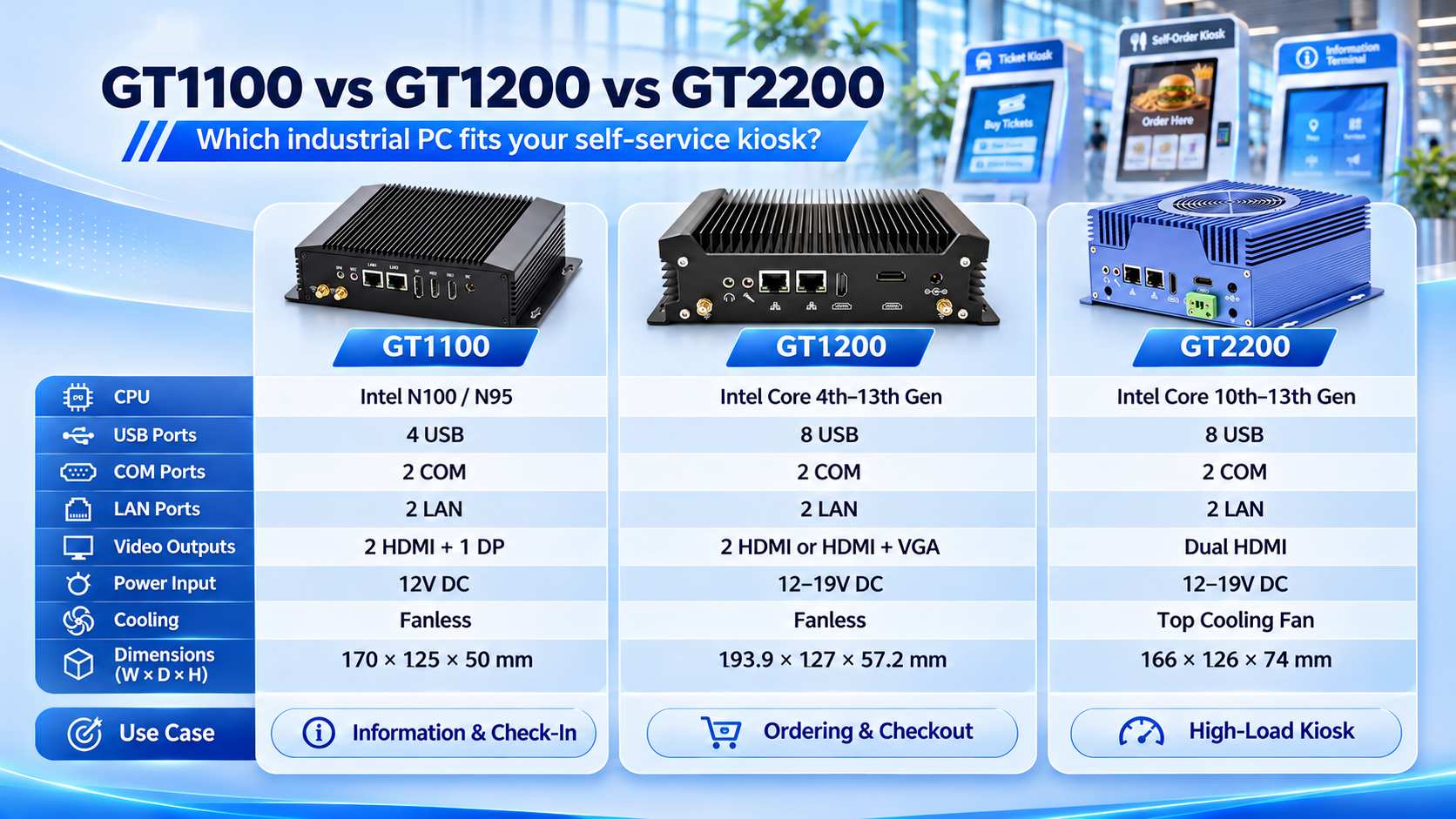
3. JIERUICC GT1100 vs. GT1200 vs. GT2200: Hardware Comparison
JIERUICC offers several industrial computing platforms for kiosk manufacturers, OEM equipment suppliers, and system integrators.
The GT1100, GT1200, and GT2200 address different combinations of processing performance, connectivity, cooling, and installation space.
Industrial PC Specification Comparison
| Specification | GT1100 | GT1200 | GT2200 |
| Processor | Intel N100; N95 platform option | Intel Core i3/i5/i7, multiple generations | Intel Core i3/i5/i7, 10th–13th Gen; optional Core Ultra |
| Memory | 1 × DDR4 SO-DIMM, up to 16GB | DDR3L / DDR4 / DDR5, depending on CPU version | DDR4 / DDR5, depending on CPU version |
| Storage | M.2 2280, mSATA, 2.5″ SATA options | mSATA or M.2 SSD + SATA, depending on platform | M.2 2280 SSD + 2.5″ SATA |
| USB | 2 × USB 3.0 + 2 × USB 2.0 | 4 × USB 3.0 + 4 × USB 2.0 | 4 × USB 3.0 + 4 × USB 2.0 |
| Serial Ports | 2 × RS232 COM | 2 × RS232 COM | 2 × RS232 COM |
| Ethernet | 2 × Gigabit LAN | 2 × Gigabit LAN | 2 × Gigabit LAN |
| Display Output | 2 × HDMI + 1 × DP | 2 × HDMI or HDMI + VGA | 2 × HDMI |
| DC Input | 12V DC | 12–19V DC | 12–19V DC |
| Cooling | Fanless aluminum chassis | Fanless aluminum chassis | Aluminum chassis + top cooling fan |
| Chassis Dimensions | 170 × 125 × 50 mm | 193.9 × 127 × 57.2 mm | 166 × 126 × 74 mm |
| Suitable Applications | Information, check-in, queue kiosks | Ordering, checkout, ticketing | Multifunction kiosks, higher-workload terminals |
Specifications reflect published product-family information. CPU, memory, storage, operating system, and optional features can vary by configuration. Confirm the final configuration and power adapter before purchasing.
4. Which JIERUICC Industrial PC Should You Choose?
GT1100: Compact, Cost-Effective Hardware for Basic Kiosks
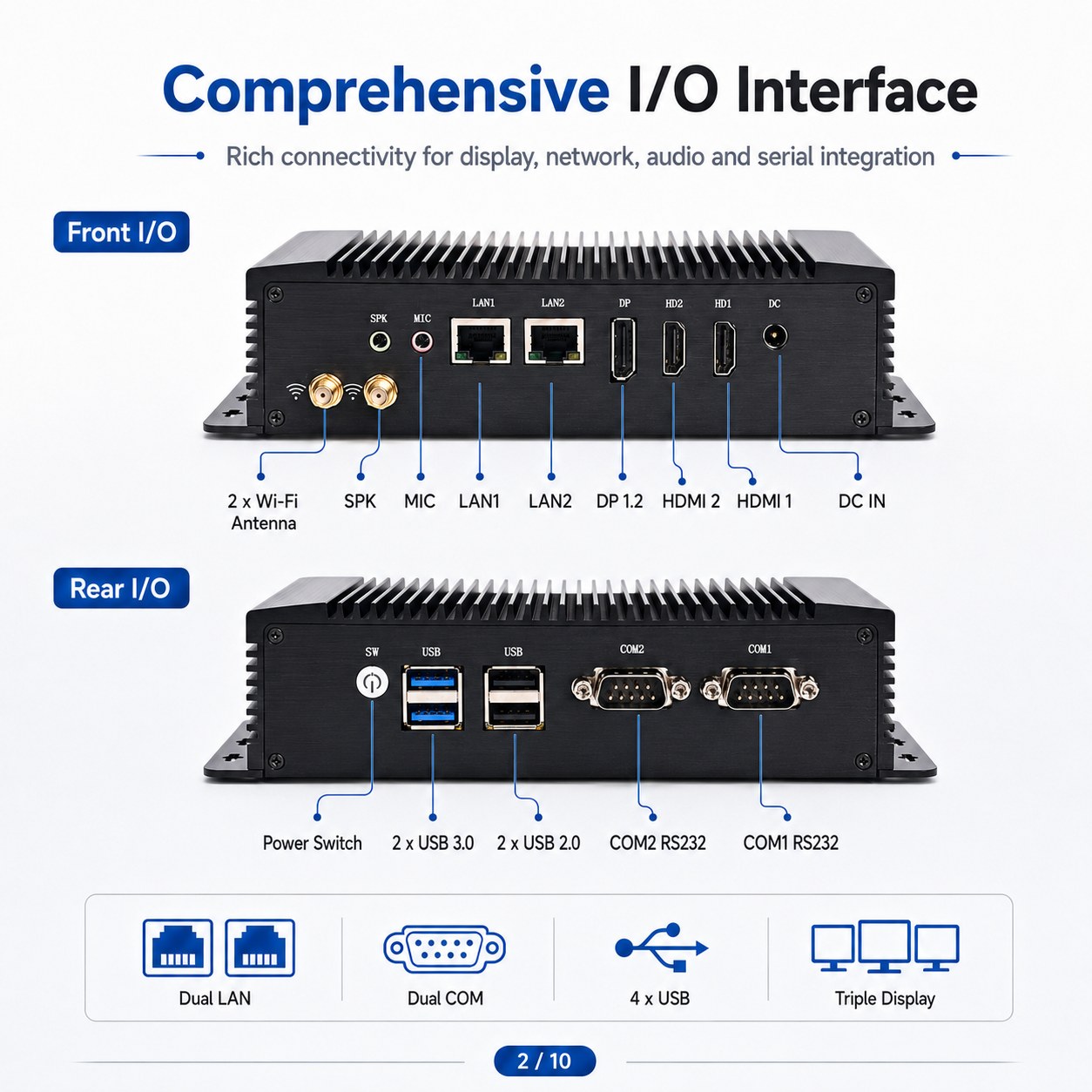
The JIERUICC GT1100 Industrial Mini PC is a practical choice for kiosk manufacturers seeking a compact, low-power platform.
Powered by an Intel N100 processor, it provides two Gigabit LAN ports, two RS232 COM ports, four USB ports, and three display outputs.
Its fanless aluminum enclosure measures only 170 × 125 × 50 mm.
Recommended applications: Information kiosks, visitor registration terminals, queue management machines, and simple ticket collection systems.
For cost-sensitive projects with limited peripheral requirements, the GT1100 is a sensible starting point.
GT1200: Flexible Fanless Computing for Multifunction Kiosks
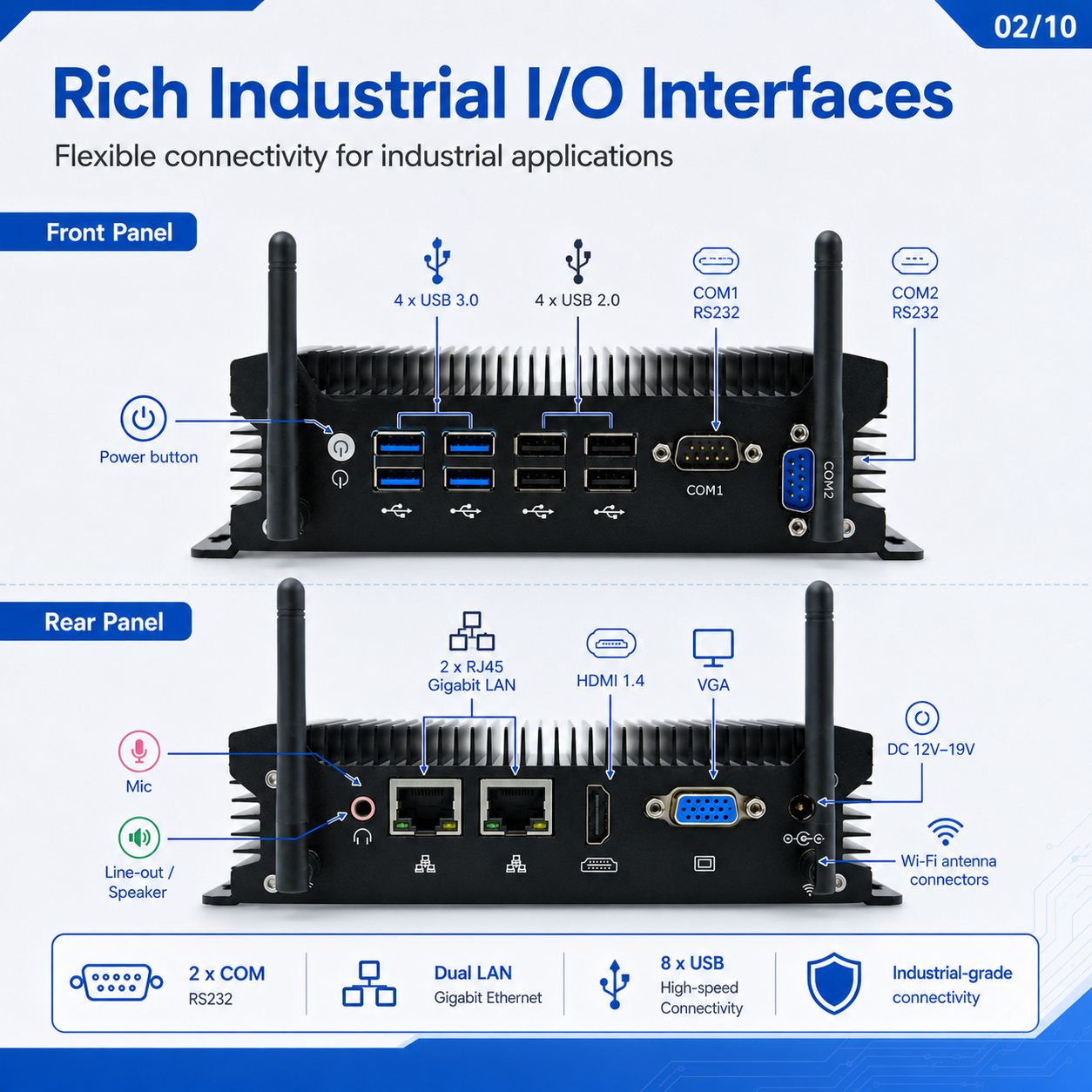
The JIERUICC GT1200 Industrial PC is suitable for kiosk applications requiring more processing flexibility and additional peripheral connections.
Its Intel Core processor options, eight USB ports, two RS232 ports, and dual Gigabit LAN make it appropriate for systems combining touchscreens, scanners, printers, and compatible payment peripherals.
The full-aluminum fanless design is particularly attractive where low noise and reduced fan maintenance are important.
Recommended applications: Restaurant ordering kiosks, self-checkout terminals, ticket vending machines, hotel check-in stations, and interactive retail terminals.
For many standard multifunction kiosk projects, the GT1200 provides a balanced combination of CPU flexibility, connectivity, and fanless construction.
GT2200: Compact Core-Based PC with Fan-Assisted Cooling
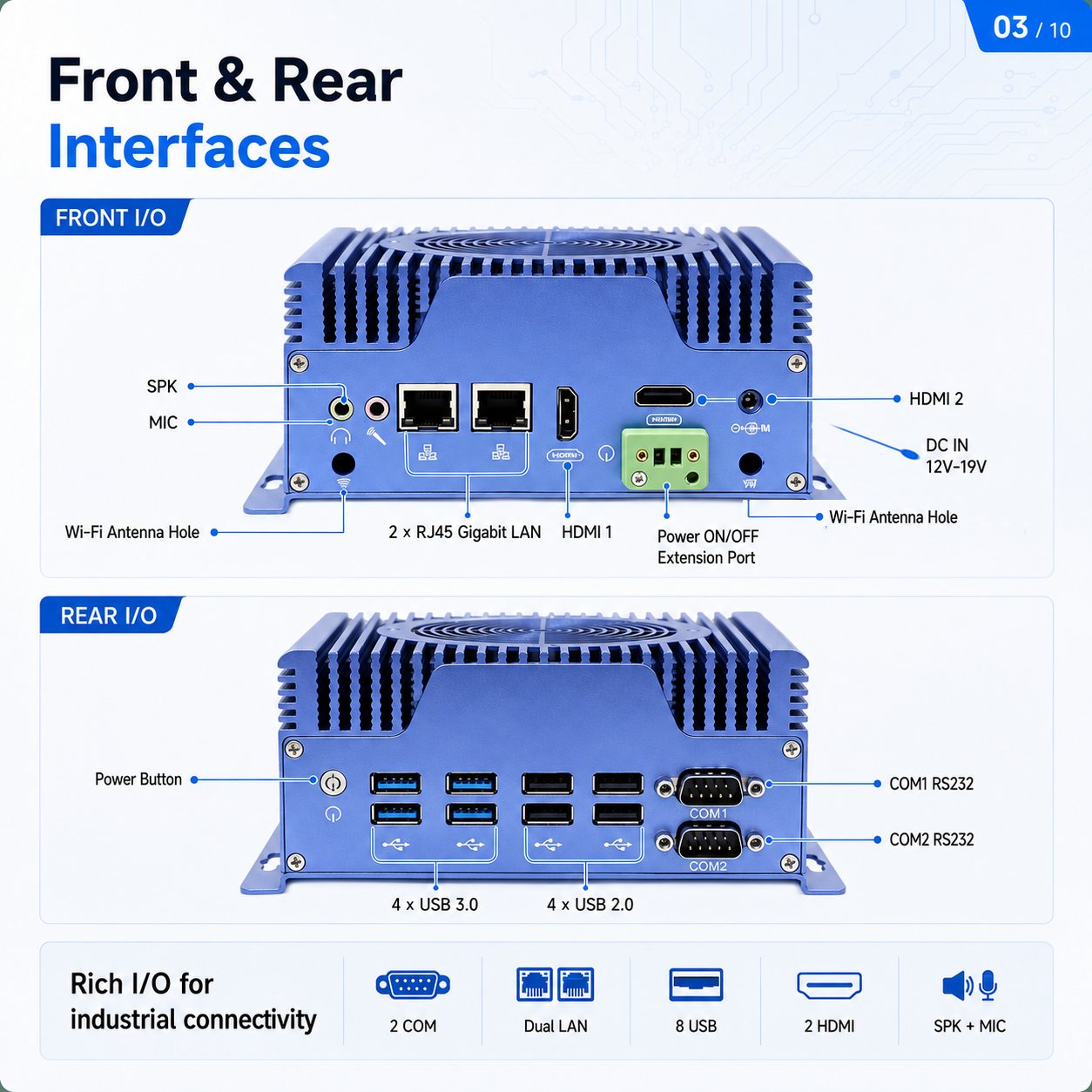
The JIERUICC GT2200 Industrial Mini PC offers Intel Core processor choices, eight USB ports, dual LAN, two RS232 COM ports, and two HDMI outputs.
Its aluminum chassis includes a top-mounted cooling fan. This makes it worth considering for applications requiring sustained processing performance where the kiosk cabinet can provide adequate ventilation.
The GT2200 measures 166 × 126 × 74 mm, offering a relatively small base footprint but a taller enclosure than the other two models.
Recommended applications: Multifunction ticketing terminals, interactive service kiosks, and systems combining multiple peripherals with more demanding local computing tasks.
Select the GT2200 when its processor configuration, thermal design, and cabinet dimensions provide an advantage for the intended application.
5. Example: Integrating an Industrial PC into a Ticketing Kiosk
Consider a self-service ticketing machine equipped with a touchscreen, QR code scanner, ticket printer, and network connection.
A typical hardware connection arrangement is:
| Component | Example PC Connection |
| Touchscreen display | HDMI |
| Touch input | USB |
| QR code scanner | USB |
| Ticket printer | USB or RS232 |
| Backend network | RJ45 LAN |
| Kiosk power supply | Approved DC input |
The industrial PC runs the ticketing application and communicates with each device through its supported interface.
The ticketing software handles ticket validation, printing instructions, and transaction status. Printer mechanisms, payment functions, and other specialized operations remain dependent on the relevant peripherals and their control systems.
For this arrangement, the GT1100 may be sufficient if the software workload is lightweight.
If additional peripherals, more demanding applications, or increased USB connectivity are required, the GT1200 or GT2200 may be more appropriate.
The final decision should be based on integration testing with the actual ticketing equipment.
6. OEM/ODM Procurement Checklist for Kiosk Manufacturers
When sourcing an industrial PC for a new kiosk project, providing a complete hardware requirements document helps suppliers recommend the right configuration and reduces unnecessary engineering changes.
Before requesting a quotation, prepare the following information:
1. Kiosk application: Ticketing, self-ordering, information, check-in, or another use case.
2. Processor and system requirements: Preferred CPU, RAM, SSD capacity, operating system, and application workload.
3. Peripheral list: Models, quantities, interfaces, communication protocols, and driver requirements.
4. Display requirements: Screen quantity, video interfaces, resolution, orientation, and touch connection.
5. Mechanical requirements: Available cabinet space, mounting drawings, connector access, and ventilation.
6. Electrical requirements: DC input, adapter specifications, power budget, and power-recovery expectations.
7. Customization requirements: Logo, enclosure color, BIOS settings, wireless connectivity, packaging, or special I/O requirements.
8. Purchasing requirements: Sample quantity, forecast annual volume, deployment country, warranty, certifications, and expected product lifecycle.
For larger OEM/ODM projects, also confirm the approved bill of materials, configuration change procedures, and replacement-unit requirements.
Not every customization is available on every motherboard. Special I/O and mechanical modifications may require engineering evaluation and minimum order quantities.
7. Validate the Complete Kiosk Before Mass Production
Selecting a suitable industrial PC is only the first step. The complete kiosk should be tested in its actual enclosure before volume deployment.
Peripheral stability: Operate the touchscreen, scanner, printer, and other connected devices together. Verify that USB devices reconnect correctly after restarts and that serial communication remains stable.
Power recovery: Simulate power interruptions and confirm BIOS startup behavior, operating system recovery, application restart, and safe handling of incomplete transactions.
Thermal performance: Test the installed kiosk under realistic ambient temperatures and sustained workloads. Monitor processor temperature, throttling, and ventilation performance.
Network interruption: Disconnect and restore network connectivity to evaluate reconnection and approved offline functions.
Production consistency: After successful testing, standardize the CPU, motherboard version, BIOS settings, RAM, SSD, drivers, and operating system image.
A documented acceptance test reduces the risk of discovering integration issues after hundreds of kiosks have been deployed.
8. Frequently Asked Questions
What is the best industrial PC for a self-service kiosk?
The best choice depends on the application and peripheral requirements. An Intel N100-based PC such as the GT1100 can be suitable for basic kiosks, while Core-based models such as the GT1200 and GT2200 offer more processing options and additional USB connectivity.
Can an industrial PC connect to a touchscreen and receipt printer?
Yes. A compatible touchscreen can use HDMI, DisplayPort, or VGA for video and USB for touch input. A receipt printer may use USB, RS232, or Ethernet, depending on its design. Always verify drivers and communication protocols.
Is a fanless industrial PC better for kiosks?
Fanless designs eliminate cooling-fan maintenance and can be useful for quiet or dusty environments. However, proper enclosure heat dissipation is still necessary. Fan-assisted cooling may be appropriate for some higher-workload applications.
What happens when a kiosk loses power?
Industrial PCs with supported automatic power-on functionality can restart when power returns. The BIOS must be configured correctly, and the application must handle recovery, peripheral reconnection, and interrupted operations.
Can an industrial PC support multiple kiosk peripherals?
Yes, provided there are enough compatible ports and sufficient processing and power capacity. The GT1200 and GT2200 each offer eight USB ports, two RS232 ports, and dual Gigabit LAN in their published standard configurations.
Can JIERUICC customize industrial PCs for OEM kiosk projects?
Yes. JIERUICC offers OEM/ODM services covering hardware configurations, branding, enclosure options, BIOS settings, and project-specific requirements. Customizations are subject to technical feasibility and order requirements.
9. Why Work with JIERUICC for Your Kiosk Hardware?
JIERUICC is a Shenzhen-based industrial mini PC manufacturer with approximately 15 years of experience in mini PC and embedded computing production.
We supply industrial computing hardware to international distributors, equipment manufacturers, system integrators, and project buyers.
Our manufacturing capabilities cover PCB assembly, SMT production, system assembly, aging tests, quality inspection, and shipment.
For self-service kiosk projects, JIERUICC focuses on providing the industrial computer hardware platform, including processor selection, I/O compatibility, mechanical configuration, and OEM/ODM customization.
Kiosk application software, payment integration, peripheral protocols, and complete system implementation are managed by the customer’s development team or system integrator.
This division of responsibilities allows JIERUICC to focus on hardware manufacturing while supporting customers in selecting equipment that matches their project requirements.
Explore our industrial PC product range and self-service terminal hardware solutions for more information.
10. Request an Industrial PC Configuration for Your Kiosk Project
Choosing the right industrial PC for self-service kiosk equipment requires a practical balance of performance, connectivity, physical dimensions, power compatibility, and long-term maintenance.
The GT1100 is a cost-effective option for lightweight kiosk applications. The GT1200 offers fanless construction and flexible Core processor options for multifunction systems. The GT2200 provides another Core-based platform with fan-assisted cooling for suitable higher-workload installations.
Are you developing or manufacturing self-service kiosks, ticketing machines, or interactive terminals?
Send JIERUICC your kiosk application, peripheral list, preferred processor, enclosure dimensions, and estimated purchasing quantity.
Our team can help you compare suitable industrial PC configurations, evaluate OEM/ODM requirements, and arrange sample hardware for integration testing.
Contact JIERUICC to Request a Kiosk Industrial PC Quotation
Website: www.jieruicc.com
JIERUICC — Industrial Mini PC Hardware for Your Self-Service Equipment Projects.